
Description
This WooCommerce to Sage accounting integration plugin enables you to automatically generate Sage Sales Invoices and record invoice payments directly from your WooCommerce orders. This seamless data synchronization captures all transaction details, including line items, applicable taxes, shipping costs, payment fees, and discounts, triggered instantly whenever an order is created or its status changes.
Sage business cloud accounting is designed especially for small and medium businesses to manage all accounting activities. Sage Accounting (get 90% off for 6 months) is easy to use and set up to immediately save time, improve cash flow, and get you paid faster.
Features
- Create a Sage contact from WooCommerce order billing information.
- Create Sage Invoice from WooCommerce order.
- Create Sage Payment when an order is paid or completed.
- Support tax mapping: no-tax, single tax rate, or mixed tax rates.
- Support syncing shipping cost, fees, and discounts.
- Automatically detects existing customers in Sage to prevent creating duplicate customers.
- Support syncing past (historical) order data.
- Two-way stock sync.
WooCommerce Sage version compatibility
Our WooCommerce Sage accounting integration plugin support “accounting start”, “accounting standard” and “accounting plus” plan of Sage business cloud accounting online software and with below countries only:
- United Kingdom, Ireland, Canada.
Screenshots
Our plugin supports two synchronization modes: automatic and manual.
>In automatic mode, you can choose which event will trigger the sync, such as when the customer places an order, when the payment is completed, or when the order status changes to completed.
In manual mode, click “Sync Contact”, “Sync Invoice”, or “Sync Payment” to send WooCommerce order to desired object on Sage:

After the sync, your order has been converted to Contact and Invoice (additionally, the plugin can also record the payment for you if desired).

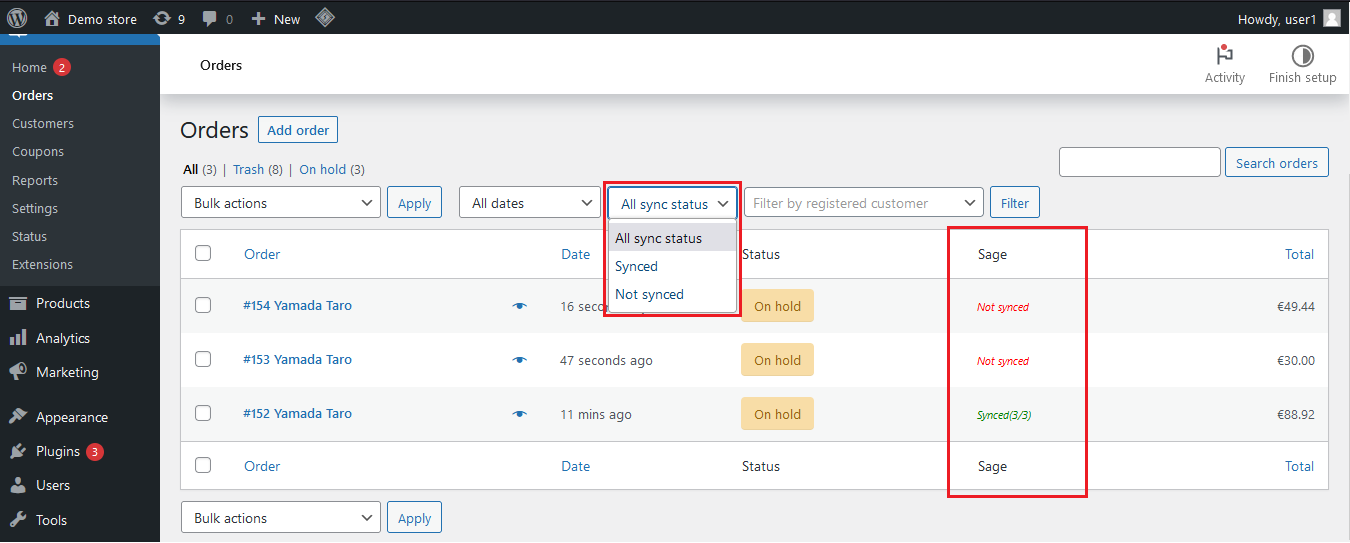
Filter orders by sync status
If you want to view only orders that have been synced or haven’t been synced, at the WooCommerce orders page, select synced/un-synced at the dropdown and apply filter:

Syncing past order data
The plugin includes batch sync tool that helps you sync past orders. You simply select the order created date range, and this tool will run automatically in the background.
Two-way stock sync
This plugin enables two-way stock syncing between WooCommerce and Sage. It automatically syncs item stock levels between WooCommerce and Sage, running seamlessly in the background.
Installation requirement
- PHP 5.6 or above.
- WordPress 4.9 or above.
- Woocommerce 3.0 or above.
Support
- One year for plugin update and ticket support.
- Free installation service.
Last update & changelog
- Bugs fix
- Shipping tax sync supported
- Bugs fix
- Upgrade in the Batch Sync Tool feature
- Multi language support
- Bugs fix
- Add manual product mapping screen
- Fix unable to get tax code when rate is zero
- Add batch cron job sync
- Code refactoring
- Add tax mapping
- Bugs fix
- First release



sohan.lged –
This is 1000 times better than the Zapier or others and the seller is awesome. I customize this plugin what i exactly need and the developer is help me according to my needs. I’m recommending to buy this plugin. Thanks